My Laptop Experience: Student Reviews of Lenovo, Acer, HP and Apple Laptops
Plample's Head of Marketing looks back at four laptops he actually owned through school and university, and what each one got right and wrong.
The Plample Team
Updated June 2026 · 10 min read
Introduction: Why we're reviewing our own old laptops
Finding the right laptop can be a hard task, which is why we created Plample to help you find your perfect laptop match. However, as handy as technical specifications are in helping you understand if a laptop will work for you on paper, they don't show how it works in the real world, which is where this blog post comes in. The Plample team is dusting off our old laptops and sharing our personal experiences with them to give you some real-world laptop insights.
To quickly introduce who I am, I'm Noah, Head of Marketing and Content Creation for Plample. I'm currently in my 4th year at the University of Bath studying Business. I typically use my laptop for uni work and watching TV and movies. Since I'm doing Business, I'm not required to use any heavy software, and most of my work usually involves Google Chrome and the typical Microsoft stuff like Excel, PowerPoint and Word. I do use CapCut and Canva for Plample work but they aren't massively heavy to run. Gaming isn't something I do on my laptop at all.
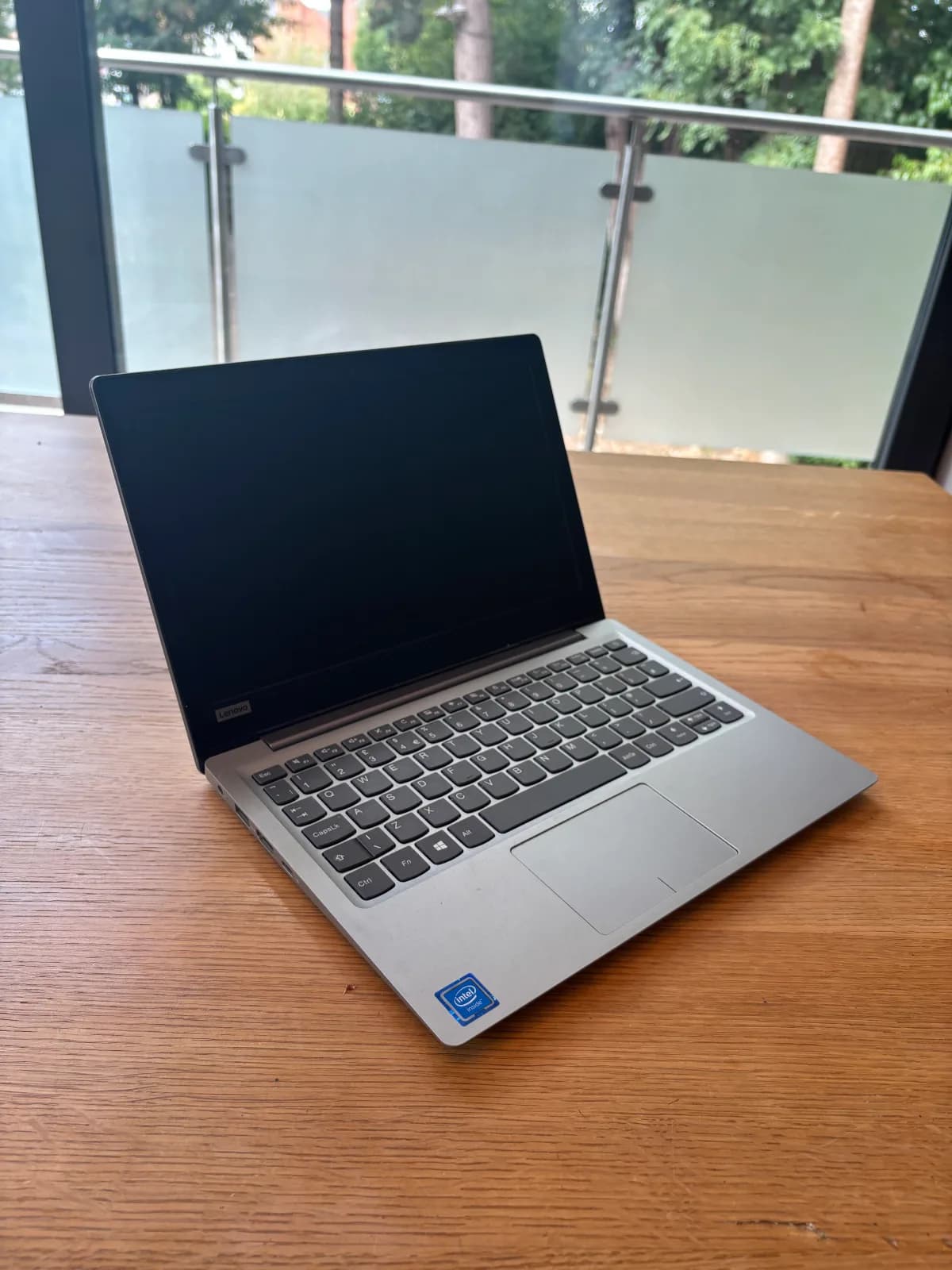
Laptop 1: Lenovo Ideapad 120S 11IAP (2019-2020)
Lenovo Ideapad 120S 11IAP
- Processor
- Intel Celeron N3350 (1.10 GHz base)
- Graphics
- Integrated Intel HD Graphics 500
- RAM
- 4GB
- Storage
- 32GB
- Operating System
- Windows 10
- Screen Size
- 11.6 inch
- Resolution
- HD (1366 x 768), 16:9
- Weight
- around 1.1kg (2.54 lbs)
- USB Ports
- 2x USB 3.0, 1x USB 3.1 Type-C
- Video Output
- 1x HDMI
- Wireless
- 802.11ac Wi-Fi, Bluetooth 4.0/4.1
- Camera
- 0.3MP fixed-focus webcam, dual array mics
- Battery
- 2-cell Li-ion, approx. 28-32 Wh, up to 8 hours
- Power Adapter
- 45W AC adapter
My experience
This was very much a starter laptop. My parents bought it for around £200 so it was a very basic laptop with just about enough capacity to run the basic Microsoft programmes and Chrome. I managed to run Roblox on it too, but after a few months I experienced a lot of issues with the storage, which meant I couldn't complete any Roblox updates and so couldn't play it any longer. Storage was a massive problem with this laptop, even doing basic schoolwork the 32GB storage went very quickly. The biggest issue was that over 50% of the storage was system programmes, which didn't leave much capacity for other files and programmes. This was the laptop I was using at the very start of e-learning in lockdown, and I found out very quickly that it just couldn't perform to the standard I needed, which is why I replaced it with the Acer. Given the RAM was a very tight 4GB, it didn't prove to be too much of an issue with this laptop. One reason could well be that I didn't use the laptop for a long enough period for it to deteriorate the same way I've seen other laptops suffer.
The display and design were ok. It's on the smaller side of laptops and was arguably too small, 11.6 inch is tiny for a laptop and it did get quite tedious after a while working on such a small screen. I was also only using it at home, so I didn't get to experience the portability benefits of having a laptop so compact. The ports and connectivity were solid. Aside from the USB ports for external storage, I didn't use any of the others really, but having the choice was certainly a good thing. No major callouts about the power and multimedia either. I don't remember how good the battery was when I stopped using it, but it seemed to charge quickly, and the battery held up quite well when rebooting it for this blog.
Overall, it was an ok budget laptop. I imagine I didn't experience many of the same issues I've had with other laptops simply because I didn't use it for a long enough period. It performed the basic tasks well and it's surprisingly in the best condition out of all my former laptops right now, which is quite impressive. The main issue was that limited storage, just far too little.
Laptop 2: Acer Aspire A515-43 (2020-2022)
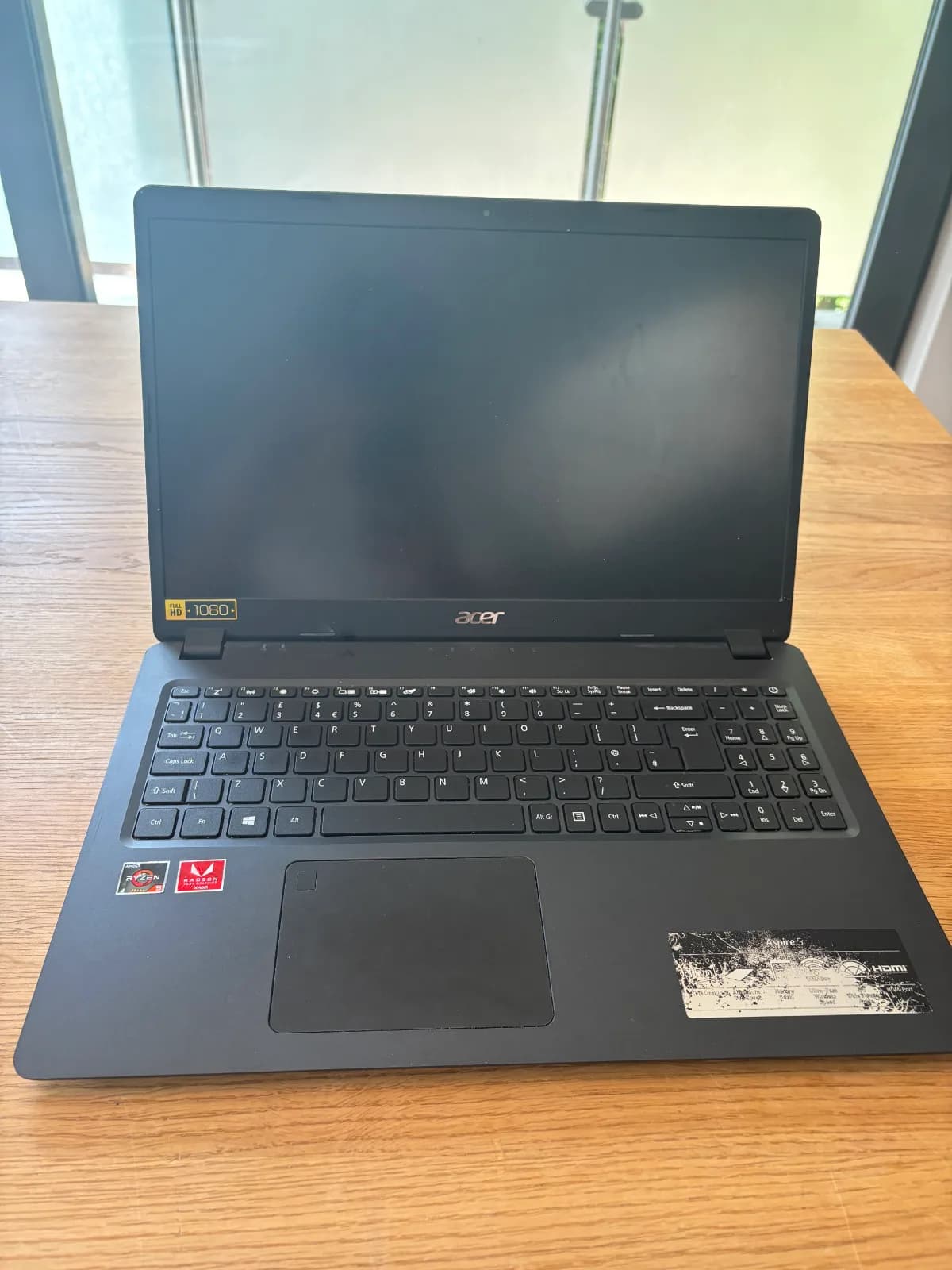
Acer Aspire A515-43
- Processor
- AMD Ryzen 5 3500U quad-core (2.10 GHz base)
- Graphics
- Integrated AMD Radeon Vega 8
- RAM
- 8GB
- Storage
- 256GB
- Operating System
- Windows 11
- Screen Size
- 15.6 inch
- Resolution
- Full HD (1920 x 1080), 16:9, matte finish
- Weight
- around 1.8-1.9kg (3.97-4.2 lbs)
- USB Ports
- 1x USB 3.1 Gen 1, 2x USB 2.0 (one power-off charging)
- Video Output
- 1x HDMI with HDCP support
- Wireless
- RJ-45 Gigabit Ethernet, 802.11ac Wi-Fi, Bluetooth
- Camera
- HD webcam (1280 x 720)
- Battery
- Li-ion, up to 7.5 hours depending on usage
- Power Adapter
- 65W AC adapter
My experience
This was easily my favourite laptop before my Macbook. It felt like a massive upgrade from the Lenovo, and I loved the gaming features that came with the AMD GPU. Even with 8GB RAM, it ran Fortnite and Roblox very smoothly (they were the only games I really used the laptop for, although I did try Rocket League a few times, and it ran that fine too). Fortnite particularly ran very well, the graphics were very good, and the fps was solid too. At this time I had a PS4, and I would use this laptop over the PS4 to play Fortnite because it ran it way better. I got this laptop during e-learning during lockdown, so I used it for a lot of schoolwork too, and it performed the way you would want it to. The 8GB RAM didn't feel tight at all, and the 256GB storage was a big upgrade. Even now the storage isn't close to being full (but that's also likely because of me deleting Fortnite, which is a big file).
This laptop took me through both COVID lockdowns and the first year of Sixth Form until I needed a more portable laptop to take into school. The biggest issue with this laptop was its portability, it was too big for my schoolbag and heavy too, which is why I needed to get a new laptop. In retrospect, I probably should've taken this laptop to university with me instead of the HP simply because it would've held up far better, but I think just getting used to the HP was the reason why it never happened. When needing to use the laptop a couple of years after, I found the battery had been completely depleted so it can only be used as a desktop as it didn't hold charge any longer. When I booted it up for this blog, it felt slow and dated, which is a shame considering how good it was at its prime. Saying that, it's still in far better condition than the HP.
I used the ports available on this laptop very fully. I regularly used the USB slots for external storage and wireless mice. The headphone jack was also very handy for e-learning where I had a lot of classes on Microsoft Teams. I didn't use the HDMI port too much, but it was handy a couple of times. Having a high-quality webcam was definitely useful here, especially when taking online classes during COVID. If I remember correctly, the battery life on this was solid too, but as I was mostly using it at home it was plugged in most of the time anyway, so I wasn't able to get an accurate measure of it the same way as recent laptops.
Overall, I really enjoyed having an Acer. It was best suited for me at that period of time when I was able to spend more of my free time gaming than I do today. I'm not sure how well Acers are today, but it looks like they are still bringing out Acer Aspires, so it will be interesting to see how they have upgraded over time.
Laptop 3: HP Laptop 14s-dq2xxx
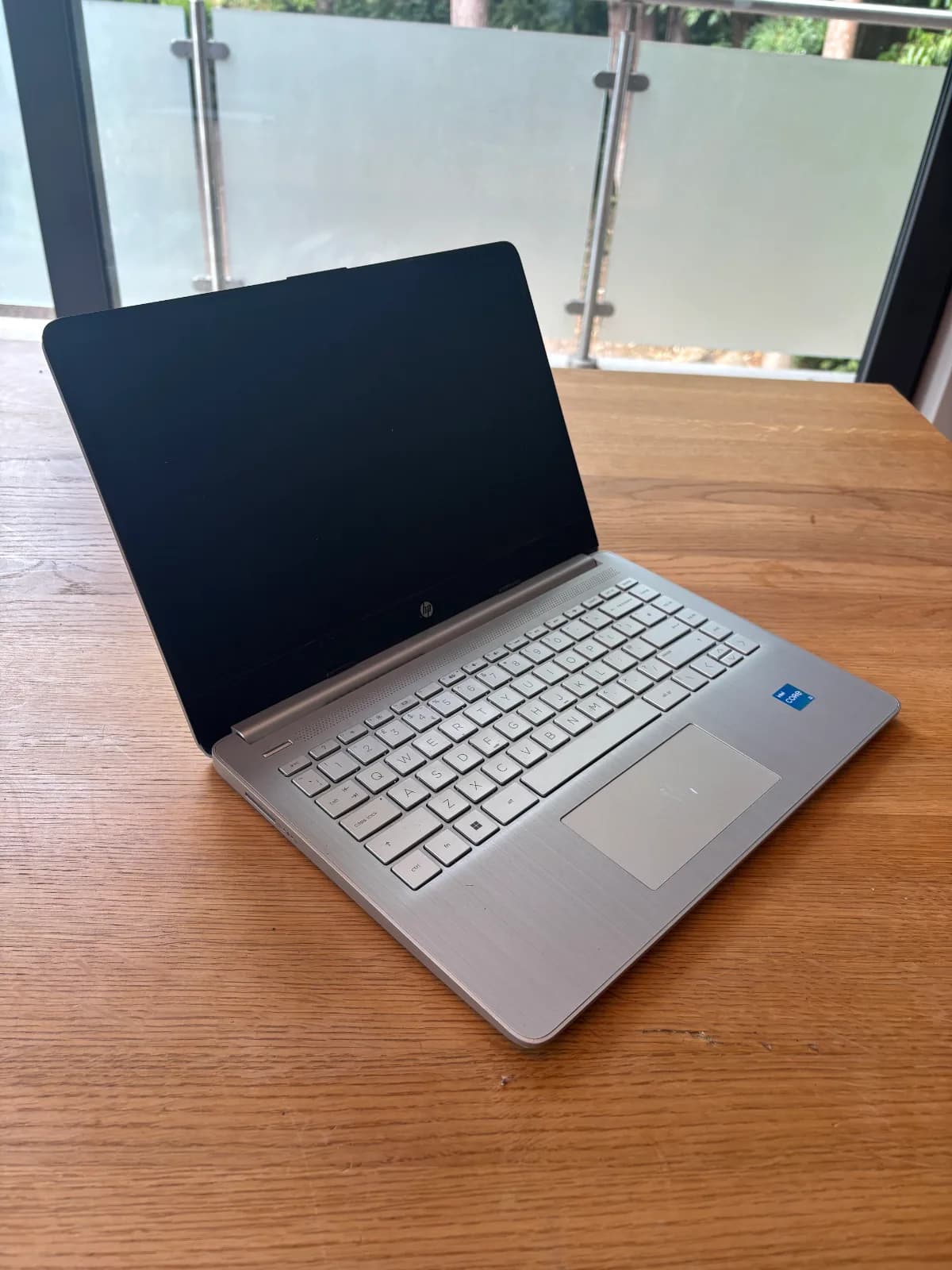
HP Laptop 14s-dq2xxx
- Processor
- 11th Gen Intel Core i3-1115G4 (2.90 GHz base)
- Graphics
- Intel UHD Graphics
- RAM
- 4GB
- Storage
- 128GB
- Operating System
- Windows 11
- Screen Size
- 14 inch
- Resolution
- Full HD (1920 x 1080), anti-glare, micro-edge
- Weight
- 1.46kg (3.22 lbs)
- USB Ports
- 2x USB Type-A, 1x USB Type-C (5Gbps)
- Video Output
- 1x HDMI 1.4b
- Wireless
- Wi-Fi 5 (802.11a/b/g/n/ac), Bluetooth 4.2
- Camera
- HP True Vision 720p HD camera
- Battery
- 3-cell, 41 Wh, 5.5-7.15 hours mixed usage
- Power Adapter
- 45W Smart AC power adapter
My experience
I had a mixed experience with the HP. I only realised when doing this blog that this laptop only had 4GB RAM, which explains why I experienced so many issues with it. Considering it had such tiny RAM, I feel like it lasted pretty well. I even managed to run SolidWorks on it as part of my DT project in school, which I feel was the beginning of the downfall of this laptop. It lasted 1st year of university all good with very little issues. 2nd year is where the issues started coming up with very slow loading times for opening anything, and this progressively got worse into 3rd year to the point the laptop was barely usable. In 3rd year especially it was so frustrating trying to open a single PowerPoint in a lecture and it could take up to 5 minutes. For coursework too it was so annoying when I needed to research stuff, and it would just take so long for Google results to load up. No matter how many restarts and reboots I gave the laptop, nothing would improve, which is why I had to eventually replace it. When loading back onto it for this blog, it by far feels the most dated out of all the laptops simply due to how slow it is.
The 4GB RAM lesson
It still shocks me that I went for a laptop with 4GB RAM, which just shows how important putting effective research into your next laptop is. Today I would never dream of having RAM less than 16GB.
The battery life was also really poor, where towards the end of its usage a full charge would probably last about 3 hours, so I was always having to charge it at uni in between lectures. However, for university it was well suited as a laptop. It had good portability with it being a modest 14 inch screen and weighing 1.5kg, so it didn't weigh my backpack down too much. It surprises me that the HP had the same quality screen as my Acer did, considering the Acer felt way sharper. Similar to the Acer, I used the ports very fully on this one too, where I used the USB ports most often for external storage and wireless mice. I used the HDMI port very regularly too when wanting to connect to TVs in accommodation or uni rooms when practising presentations. The camera was ok, it didn't feel as good as the Acer's, but it managed to get me through internship interviews all good so I can't complain about it too much.
Overall, I feel like it did the job at the start, but it deteriorated very quickly, which made it unusable within a few years. This is personal experience, but I have had a way better experience with AMD chips compared to Intel. Intel chips just don't feel as powerful, and this HP showed the limitations of having an Intel chip for sure.
Laptop 4: MacBook Air 2025 (2025-present)
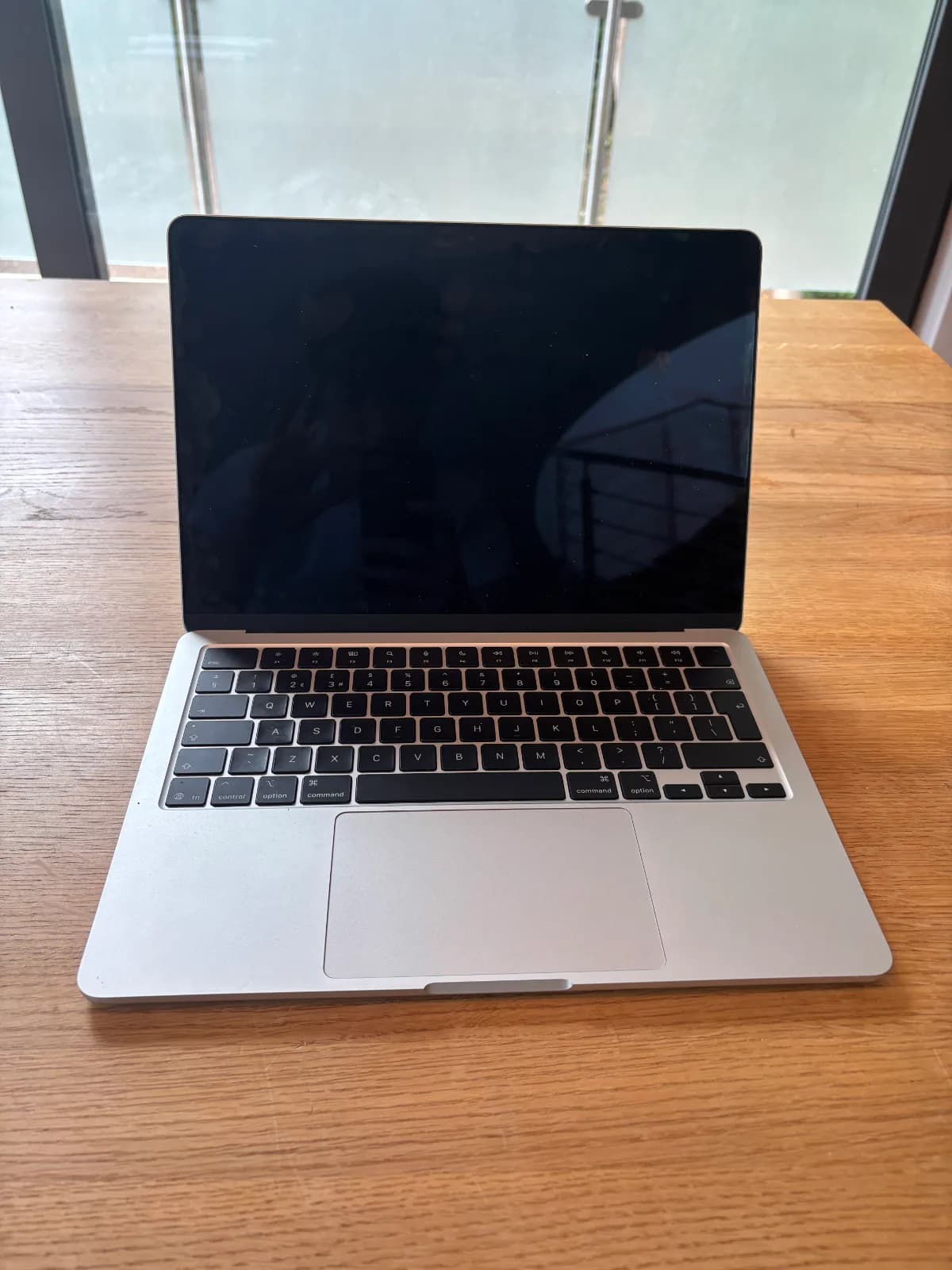
MacBook Air 2025
- Processor
- Apple M4 chip, 10-core CPU (4 performance, 6 efficiency)
- Graphics
- 8-core GPU with hardware-accelerated ray tracing
- RAM
- 16GB
- Storage
- 256GB
- Operating System
- macOS
- Screen Size
- 13.6 inch
- Resolution
- 2560 x 1664, 224 ppi, IPS LED-backlit
- Weight
- 1.24kg (2.7 lbs)
- USB Ports
- 2x Thunderbolt 4/USB 4 (up to 40Gbps)
- Video Output
- None
- Wireless
- Wi-Fi 6E, Bluetooth 5.3
- Camera
- 12MP Centre Stage camera
- Battery
- 53Wh, up to 18 hours mixed usage
- Power Adapter
- 30W adapter
My experience
Going from an HP to a Mac felt like another huge upgrade, and so far I'm enjoying my Macbook.
The Mac operating system feels smoother than Windows, and although there are some programmes you can't install, it doesn't affect me too much. I have noticed I can't get some applications such as Netflix and Disney Plus, which means I can't download any movies or shows from them for long journeys, but luckily Amazon Prime is a downloadable application which is able to perform this function. The performance itself just feels so crisp compared to all my previous laptops, and a lot of that is down to the 16GB RAM. I usually have a lot of tabs open, so having this capacity is very important. A slight downside I have experienced though is that the 256GB storage is a bit on the smaller side. I need to go through my files, but the storage has been used up quite quickly, where I only have 30GB left (which is still plenty though and not a huge concern).
Another downside I have noticed is the lack of USB ports, aside from 2 USB-C ports (which I don't typically use often). I had usually used USB ports regularly for wireless mice and external storage, so it's a bit annoying I need to buy a USB to USB-C adapter for them to work. Although I haven't needed to use it so far, not having an HDMI port is also limiting and something I need to get an adapter for, as I'm sure I will need to use it for university at some point. However, the design and display of the Mac is a big plus. The Mac is smaller and lighter than the HP, which only makes it easier for portability during travel. The screen is bigger too and sharper due to the higher pixel count, which is especially useful as I've used this laptop for a lot of TV and movies since I got it. The battery on the Mac is genuinely awesome too, I'm only having to charge it every few days, which is a massive improvement on my HP where I was having to charge it multiple times a day. I have only noticed that CapCut drains the battery, so if I don't have it open, the battery will last a long time.
Overall, I have been enjoying the Mac so far. I've enjoyed the benefits of having an Apple ecosystem when Airdropping photos to and from my phone, which is a big improvement from when I had to email them to myself with my previous laptops. I'm not an overly techy person either, so having a laptop which is easy to use has been super useful to me too. Fingers crossed it manages to last a good few years.
Skip the spec-sheet stress.
Answer a few plain-English questions and Plample matches you to laptops that fit your needs, budget and the software you actually use.
Find my match →